API Reference
Dataset Onboarding
Overview
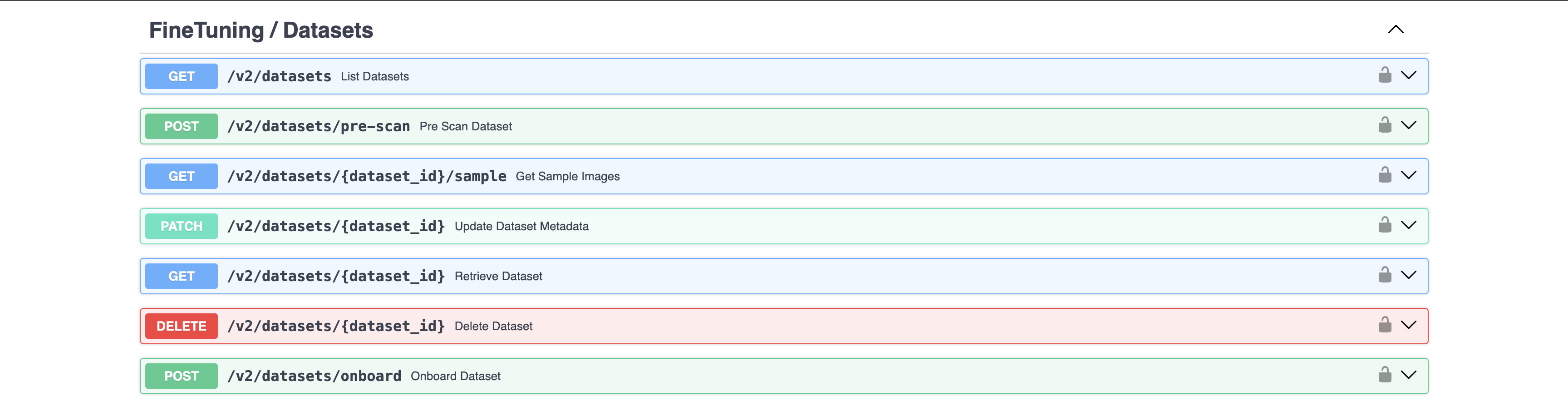
The Dataset Factory allows users to bring their curated geospatial datasets to the Studio to fine-tune their models. The dataset-factory endpoints allow users to onboard and delete datasets. In addition, some endpoints allow users to view their datasets' metadata. The front-end also uses the dataset-factory API to provide users with a preview of their datasets.
Where to Access
We recommend that users utilize the Geospatial Studio UI instead for the more user-friendly and appealing interface.
How to Onboard Datasets
To onboard a dataset to the Dataset Factory, the user needs to provide the following:
| Field | Data Type | Example | Requirements |
|---|---|---|---|
dataset_name |
String (space characters allowed) | UK 2013-2019 Flood Data |
A descriptive name which helps the user recognize the dataset would suffice |
data_sources |
List | [{"bands": [{"index":"0", "band_name": "VV (Gray)", "description": ""},{"index":"1", "band_name": "VH", "description": ""}],"connector": "sentinelhub","collection": "s1_grd","modality_tag": "S1GRD","align_dates": "true","file_suffix": "_S1Hand.tif","scaling_factor": [1, 1]}] |
A list containing information about each data source for the dataset. Including the data connector (e.g sentinelhib or nasa_earthdata), and information about the collections (collection name, bands, scaling factor, etc) |
label_categories |
List of dictionaries | [{ "id": "0", "name": "Floods", "description": "Flooding assets" }] |
Each dictionary in the list contains id, name, and description, where id and label are required fields, and description is not required |
dataset_url |
String | https://ibm.box.com/shared/static/t682cwbcc5np6db9c6uj35lu2559ij26.zip |
Any link which would allow direct download of a zip file. |
description |
String (space characters allowed) | 2013-2019 Image from Sentinel Hub. The tiff files are 512 x 512 and containing 6 bands |
Something descriptive would suffice |
training_data_suffix |
List of strings (no space allowed) | _imageHand.tif |
This is the suffix which the training image files have. This allows the onboarding pipeline to correctly find all images from all directories. |
label_suffix |
String (no space allowed) | _labelHand.tif |
This is the suffix which all the label files have. This allows the onboarding pipeline to correctly find all labels from all directories. The training_data_suffix and label_suffix much be distinct. |
purpose |
String | Regression |
The available options are Regression, Segmentation, Generate, NER, Classify, Other |
training_params |
Dictionary | Configure training parameters for the model |
An example payload could look like the following:
{
    "dataset_name": "Sentinel Flood Multimodal",
    "data_sources": [
        {
            "bands": [
                {"index":"0", "band_name": "Coastal_aerosol", "description": ""},
                {"index":"1", "band_name": "Blue", "RGB_band": "B", "description": ""},
                {"index":"2", "band_name": "Green", "RGB_band": "G", "description": ""},
                {"index":"3", "band_name": "Red", "RGB_band": "R", "description": ""},
                {"index":"4", "band_name": "05_-_Vegetation_Red_Edge", "description": ""},
                {"index":"5", "band_name": "06_-_Vegetation_Red_Edge", "description": ""},
                {"index":"6", "band_name": "07_-_Vegetation_Red_Edge", "description": ""},
                {"index":"7", "band_name": "08_-_NIR", "description": ""},
                {"index":"8", "band_name": "08A_-_Vegetation_Red_Edge", "description": ""},
                {"index":"9", "band_name": "09_-_Water_vapour", "description": ""},
                {"index":"10", "band_name": "11_-_SWIR", "description": ""},
                {"index":"11", "band_name": "12_-_SWIR", "description": ""},
                {"index":"12", "band_name": "Cloud_Probability", "description": ""}
            ],
            "connector": "sentinelhub",
            "collection": "s2_l2a",
            "modality_tag": "S2L1C",
            "file_suffix": "_S2Hand.tif",
            "scaling_factor": [1, 1, 1, 1, 1, 1]
        },
        {
            "bands": [
                {"index":"0", "band_name": "VV (Gray)", "description": ""},
                {"index":"1", "band_name": "VH", "description": ""}
            ],
            "connector": "sentinelhub",
            "collection": "s1_grd",
            "modality_tag": "S1GRD",
            "align_dates": "true",
            "file_suffix": "_S1Hand.tif",
            "scaling_factor": [1, 1]
        }
    ],
    "label_categories": [
        {"id": "0", "name": "No Floods", "description": "Flooding assets"},
        {"id": "1", "name": "Floods", "description": "Flooding assets"}
    ],
    "dataset_url": "https://s3.us-east.cloud-object-storage.appdomain.cloud/geospatial-studio-example-data/sen1floods11_v1.1.tar.gz",
    "description": "Flood data from places",
    "label_suffix": "_LabelHand.tif",
    "purpose": "Segmentation"
}
Dataset Requirements
To successfully onboard a curated dataset, the dataset should meet the following requirements:
-
The dataset if contained in a
.zipfiles, and a direct download link is available and correctly enterd in the onboarding payload -
The corresponding image and label files should have the same filesname, excluding the suffixes. As an example,
subsetted_512x512_HLS.S30.T10SEH.2018190.v1.4_merged.tifandsubsetted_512x512_HLS.S30.T10SEH.2018190.v1.4.mask.tifare a corresponding pair, wheresubsetted_512x512_HLS.S30.T10SEH.2018190.v1.4is the matching filename body, and_merged.tifand.mask.tifare the suffixes. If the names don't match, onboarding won't proceed. -
For any dataset for
Segmentationpurpose, please make sure 2 categories are included in thelabel_categoriesfield in the onboarding payload.
Dataset Factory API Endpoints
List Datasets
GET /v2/datasets
Lists all datasets available to the logged in user.
Example
curl -kX GET /v2/datasets \
-H 'Accept: application/json' \
-H 'X-API-Key: {API_KEY}'
Parameters and Responses
200 Response
    {
    "total_records": 0,
    "page_count": 0,
    "results": [
        {
        "id": "string",
        "active": true,
        "created_by": "",
        "created_at": "2026-03-09T09:02:40.666Z",
        "updated_at": "2026-03-09T09:02:40.666Z",
        "dataset_name": "string",
        "description": "",
        "dataset_url": "",
        "label_suffix": "",
        "purpose": "",
        "data_sources": "string",
        "label_categories": "string",
        "size": "",
        "status": "",
        "error": "",
        "logs": "",
        "onboarding_options": {}
        }
    ]
    }
| Name | In | Type | Required | Description |
|---|---|---|---|---|
| dataset_name | query | string | false | Filter by the name of the dataset. |
| purpose | query | array | false | Filter by the dataset purpose. |
| status | query | string | false | Filter by the status of the dataset. |
| summary | query | boolean | false | Flag to return summary of datasets or full view. |
| limit | query | integer | false | The maximum number of items to retrieve (default: 25). |
| skip | query | integer | false | The number of items to skip (default: 0). |
Retrieve Dataset
GET /v2/datasets/{dataset_id}
Retrieves a single dataset by the dataset_id.
Example
curl -kX GET /v2/datasets/{dataset_id} \
-H 'Accept: application/json' \
-H 'X-API-Key: {API_KEY}'
Parameters and Responses
200 Response
{
  "id": "string",
  "dataset_name": "string",
  "description": "string",
  "purpose": "Segmentation",
  "dataset_url": "string",
  "label_suffix": "string",
  "data_sources": [],
  "label_categories": [],
  "status": "completed",
  "created_by": "string",
  "created_at": "2025-08-27T07:18:25.834Z",
  "updated_at": "2025-08-27T07:18:25.834Z"
}
Submit Dataset for Onboarding
POST /v2/datasets/onboard
Submits a new dataset for onboarding to the Dataset Factory.
Example
curl -kX POST /v2/datasets/onboard \
-H 'Content-Type: application/json' \
-H 'Accept: application/json' \
-H 'X-API-Key: {API_KEY}'
-d '{
  "dataset_name": "Sentinel Flood Multimodal",
  "data_sources": [
    {
      "bands": [
        {"index":"0", "band_name": "Coastal_aerosol", "description": ""},
        {"index":"1", "band_name": "Blue", "RGB_band": "B", "description": ""},
        {"index":"2", "band_name": "Green", "RGB_band": "G", "description": ""},
        {"index":"3", "band_name": "Red", "RGB_band": "R", "description": ""}
      ],
      "connector": "sentinelhub",
      "collection": "s2_l2a",
      "modality_tag": "S2L1C",
      "file_suffix": "_S2Hand.tif",
      "scaling_factor": [1, 1, 1, 1]
    }
  ],
  "label_categories": [
    {"id": "0", "name": "No Floods", "description": "Non-flooded areas"},
    {"id": "1", "name": "Floods", "description": "Flooded areas"}
  ],
  "dataset_url": "https://s3.us-east.cloud-object-storage.appdomain.cloud/geospatial-studio-example-data/sen1floods11_v1.1.tar.gz",
  "description": "Flood detection dataset",
  "label_suffix": "_LabelHand.tif",
  "purpose": "Segmentation"
}'
Parameters and Responses
See the How to Onboard Datasets section above for the complete payload structure and field requirements.
201 Response
{
  "dataset_id": "string",
  "status": "Pending",
  "message": "Dataset submitted for onboarding"
}
| Status | Meaning | Description |
|---|---|---|
| 201 | Created | Dataset successfully submitted |
| 422 | Unprocessable Entity | Validation Error |
Delete Dataset
DELETE /v2/datasets/{dataset_id}
Deletes a dataset by its ID.
Example
curl -kX DELETE /v2/datasets/{dataset_id} \
-H 'Accept: application/json' \
-H 'X-API-Key: {API_KEY}'
Parameters and Responses
200 Response
{
  "message": "Dataset successfully deleted"
}
| Status | Meaning | Description |
|---|---|---|
| 200 | OK | Dataset successfully deleted |
| 422 | Unprocessable Entity | Validation Error |
Geospatial Studio Fine-tuning APIs
The Geospatial Tuning Studio provides users with a no-code way to create fine-tuned models for specific applications. The user will select the type of task they wish to carry out, the tuning dataset and the backbone model they wish to start from.
Workflow
The fine-tuning process involves the following key steps:
- Select or create a Fine-Tuning dataset in the Dataset Factory service: choose or upload geospatial data with corresponding labels that will be used for training.
- Select a tuning task type (e.g Regression or Segmentation) from a template and configure model parameters if need be or use defaults.
- Specify the base-model, downstrean task and tuning parameters: configure parameters related to the foundation model and the fine-tuning process.
- Submit a tuning job: Launch a tuning job that will adapt the model to your specified downstream task.
- Monitor training and performance: Track the progress of the fine-tuning process by monitor training metrics.
- Deploy model for inferencing: After fine-tuning, the output is a model checkpoint and configuration files. With these files, the model can be deployed to an inference service for real-world applications.
Dataset Options
To fine-tune a model for a downstream task, you need a labeled fine-tuning dataset. The Geospatial Tuning Studio provides multiple ways to acquire or upload a dataset through the dataset-factory.
Fine-Tuning Components
The fine-tuning process involves four essential components:
-
Base Models / Foundation Models: Pre-trained models that serve as the starting point for fine-tuning. These models have been trained on large geospatial datasets and are adaptable to specific tasks.
-
Downstream Tasks: These are specific tasks for which the base model is fine-tuned. Examples include tasks like flooding, fire-scars, land classification and other geospatial analyses.
-
Datasets: A Curated set of geospatial data with corresponding labels required for fine-tuning.
-
Tunes: Tunes represent the fine-tuning process itself, where the model is trained on the specified dataset and task parameters. Each tune results in a fine-tuned version of the model.
API Overview
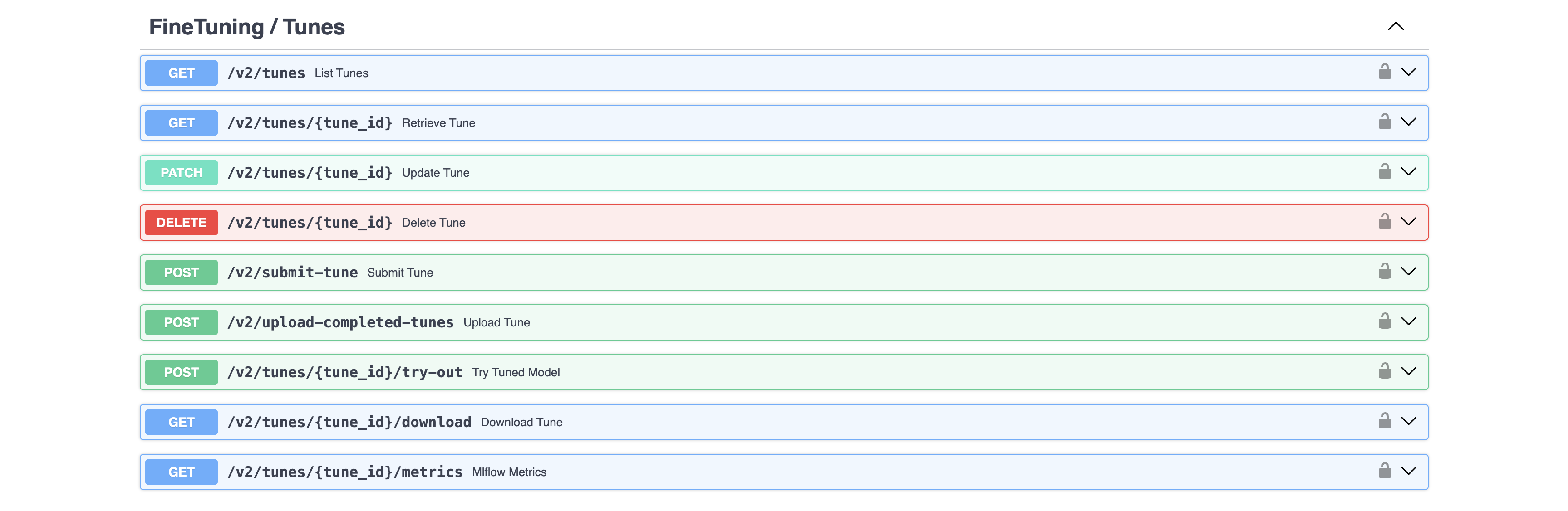
These APIs allow users to programmatically interact with the Geospatial Tuning Studio for a variety of tasks.
Tunes
Tuning geospatial models
List Tunes
GET /v2/tunes
Lists all fine tuning jobs available to the logged in user.
Example
curl -kX GET /v2/tunes \
-H 'Accept: application/json' \
-H 'Authorization: Bearer {access-token}'
Parameters and Responses
200 Response
{
"total_records": 0,
"page_count": 0,
"results": [
    {
    "id": "string",
    "active": true,
    "created_by": "",
    "created_at": "2025-08-27T07:18:25.834Z",
    "updated_at": "2025-08-27T07:18:25.834Z",
    "name": "string",
    "description": "string",
    "task": {
        "id": "3fa85f64-5717-4562-b3fc-2c963f66afa6",
        "name": "string"
    },
    "dataset_id": "string",
    "base_model": {
        "id": "3fa85f64-5717-4562-b3fc-2c963f66afa6",
        "name": "string"
    },
    "mcad_id": "",
    "status": "",
    "latest_chkpt": "",
    "logs": "",
    "metrics": ""
    }
]
}
| Name | In | Type | Required | Description |
|---|---|---|---|---|
| name | query | any | false | Filter by the name of the tune. |
| status | query | any | false | Filter by the status of the tune. |
| limit | query | any | false | The maximum number of items to retrieve. |
| skip | query | any | false | The number of items to skip. |
Retrieve Tune
GET /v2/tunes/{tune_id}
Retrieves a single fine-tuning job by the tune_id
Example
curl -kX GET /v2/tunes/{tune_id} \
-H 'Accept: application/json' \
-H 'Authorization: Bearer {access-token}'
Parameters and Responses
200 Response
{
"id": "string",
"active": true,
"created_by": "",
"created_at": "2025-08-27T07:20:03.484Z",
"updated_at": "2025-08-27T07:20:03.484Z",
"name": "string",
"description": "string",
"task": {
    "id": "3fa85f64-5717-4562-b3fc-2c963f66afa6",
    "name": "string"
},
"dataset_id": "string",
"base_model": {
    "id": "3fa85f64-5717-4562-b3fc-2c963f66afa6",
    "name": "string"
},
"mcad_id": "",
"status": "",
"latest_chkpt": "",
"logs": "string",
"metrics": [],
"config_json": {},
"progress": {
    "additionalProp1": {}
},
"logs_presigned_url": "string",
"tuning_config": "string",
"tuning_config_presigned_url": "string",
"train_options": {}
}
Submit Tune
POST /v2/submit-tune
Example
curl -kX POST /v2/submit-tune \
-H 'Content-Type: application/json' \
-H 'Accept: application/json' \
-H 'Authorization: Bearer {access-token}' \
-d '{
"name": "string",
"description": "string",
"dataset_id": "string",
"base_model_id": "3fa85f64-5717-4562-b3fc-2c963f66afa6",
"tune_template_id": "3fa85f64-5717-4562-b3fc-2c963f66afa6",
"model_parameters": {},
"train_options": {}
}'
Parameters and Responses
201 Response
{
"tune_id": "string",
"mcad_id": "string",
"status": "Pending",
"message": {
    "additionalProp1": {}
    }
}
| Status | Meaning | Description | Schema |
|---|---|---|---|
| 201 | Created | Successful Response | TuneSubmitOut |
| 422 | Unprocessable Entity | Validation Error | HTTPValidationError |
Update Tune
PATCH /v2/tunes/{tune_id}
Updates tune metadata fields.
Example
curl -kX PATCH /v2/tunes/{tune_id} \
-H 'Content-Type: application/json' \
-H 'Accept: application/json' \
-H 'Authorization: Bearer {access-token}'
-d '{
    "name": "segmentation-test-1",
    "description": "Segmentation demo example"
}
Parameters and Responses
200 Response
{
    "message": "Tune successfully updated."
}
| Status | Meaning | Description | Schema |
|---|---|---|---|
| 200 | OK | Successful Response | Inline |
| 422 | Unprocessable Entity | Validation Error | HTTPValidationError |
Delete Tune
DELETE /v2/tunes/{tune_id}
Example
curl -kX DELETE /v2/tunes/{tune_id} \
-H 'Accept: application/json' \
-H 'Authorization: Bearer {access-token}'
Parameters and Responses
| Status | Meaning | Description | Schema |
|---|---|---|---|
| 204 | No Content | Successful Response | None |
| 422 | Unprocessable Entity | Validation Error | HTTPValidationError |
Try out Tuned Model
POST /v2/tunes/{tune_id}/try-out
Example
curl -kX POST /v2/tunes/{tune_id}/try-out \
-H 'Content-Type: application/json' \
-H 'Accept: application/json' \
-H 'Authorization: Bearer {access-token}' \
-d '
{
"model_display_name": "",
"description": "try-out",
"location": "string",
"geoserver_layers": {
    "additionalProp1": {}
},
"spatial_domain": {
    "bbox": [
    [
        0
    ]
    ],
    "polygons": [
    "string"
    ],
    "tiles": [
    "string"
    ],
    "urls": [
    "string"
    ]
},
"temporal_domain": [
    "string"
],
"model_input_data_spec": [
    {
    "additionalProp1": {}
    }
],
"data_connector_config": [
    {
    "connector": "string",
    "collection": "string",
    "bands": [
        {
        "additionalProp1": {}
        }
    ],
    "scaling_factor": [
        0
    ],
    "additionalProp1": {}
    }
],
"geoserver_push": [
    {
    "workspace": "string",
    "layer_name": "string",
    "display_name": "string",
    "filepath_key": "string",
    "file_suffix": "string",
    "geoserver_style": "string",
    "additionalProp1": {}
    }
]
}'
Parameters and Responses
201 Response
{
"spatial_domain": {
    "bbox": [
    [
        0
    ]
    ],
    "polygons": [
    "string"
    ],
    "tiles": [
    "string"
    ],
    "urls": [
    "string"
    ]
},
"temporal_domain": [
    "string"
],
"fine_tuning_id": "string",
"model_display_name": "string",
"description": "string",
"location": "string",
"geoserver_layers": {
    "additionalProp1": {}
},
"demo": {
    "additionalProp1": {}
},
"model_id": "3fa85f64-5717-4562-b3fc-2c963f66afa6",
"inference_output": {
    "additionalProp1": {}
},
"id": "3fa85f64-5717-4562-b3fc-2c963f66afa6",
"active": true,
"created_by": "",
"created_at": "2025-08-27T07:24:07.317Z",
"updated_at": "2025-08-27T07:24:07.317Z",
"status": "string",
"tasks_count_total": 0,
"tasks_count_success": 0,
"tasks_count_failed": 0
}
| Status | Meaning | Description | Schema |
|---|---|---|---|
| 200 | OK | Successful Response | Inline |
| 422 | Unprocessable Entity | Validation Error | HTTPValidationError |
Download Tunes
GET /v2/tunes/{tune_id}/download
Example
curl -kX GET /v2/tunes/{tune_id}/download \
-H 'Accept: application/json' \
-H 'Authorization: Bearer {access-token}'
Parameters and Responses
200 Response
{
    "id": "string",
    "name": "string",
    "description": "string",
    "config_url": "string",
    "checkpoint_url": "string"
}
| Status | Meaning | Description | Schema |
|---|---|---|---|
| 200 | OK | Successful Response | TuneDownloadOut |
| 422 | Unprocessable Entity | Validation Error | HTTPValidationError |
Get Tune Metrics
GET /v2/tunes/{tune_id}/metrics
Example
curl -kX GET /v2/tunes/{tune_id}/metrics \
-H 'Accept: application/json' \
-H 'Authorization: Bearer {access-token}'
Parameters and Responses
200 Response
{
    "id": "string",
    "status": "FINISHED",
    "epochs": "string",
    "metrics": [
        {}
    ],
    "details": "string"
}
| Status | Meaning | Description | Schema |
|---|---|---|---|
| 200 | OK | Successful Response | TunedModelMlflowMetrics |
| 422 | Unprocessable Entity | Validation Error | HTTPValidationError |
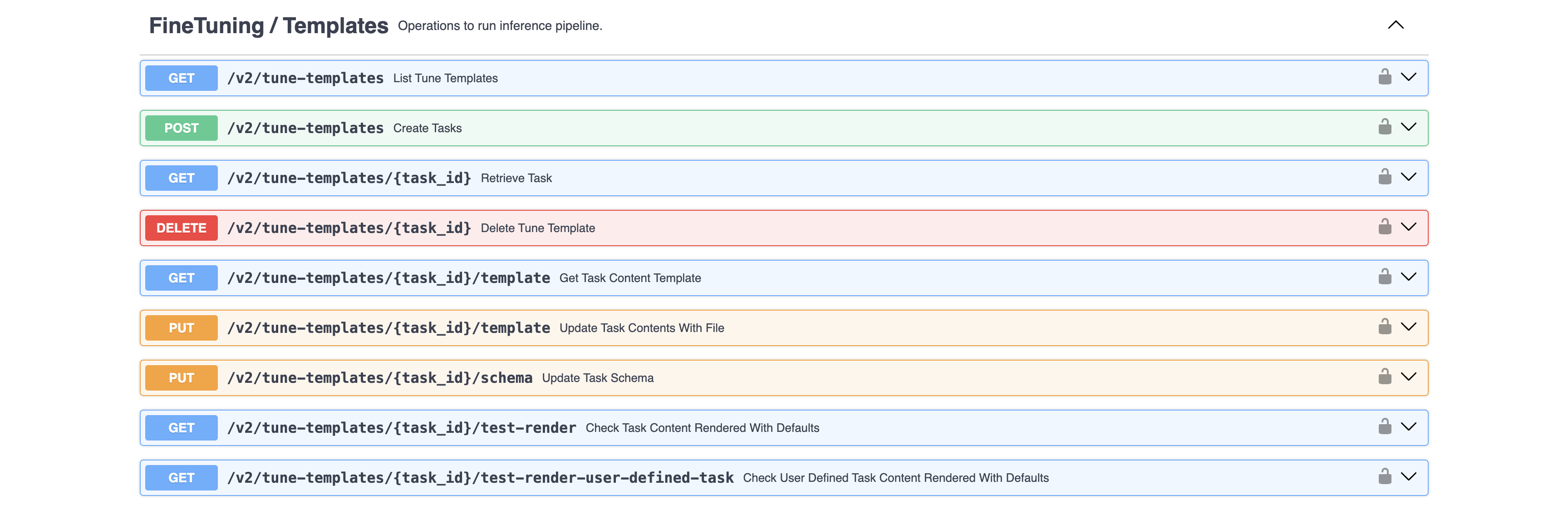
Templates
Managing available tuning tasks (i.e. experiment templates)
List Templates
GET /v2/tune-templates
Example
curl -kX GET /v2/tune-templates \
-H 'Accept: application/json' \
-H 'Authorization: Bearer {access-token}'
Parameters and Responses
200 Response
        {
"total_records": 0,
"page_count": 0,
"results": [
    {
    "id": "3fa85f64-5717-4562-b3fc-2c963f66afa6",
    "active": true,
    "created_by": "",
    "created_at": "2025-08-27T07:26:11.139Z",
    "updated_at": "2025-08-27T07:26:11.139Z",
    "name": "string",
    "description": "string",
    "purpose": "string",
    "extra_info": {
        "additionalProp1": {}
    }
    }
]
}
| Name | In | Type | Required | Description |
|---|---|---|---|---|
| name | query | any | false | Filter by the name of the tune. |
| limit | query | any | false | The maximum number of items to retrieve. |
| skip | query | any | false | The number of items to skip. |
| Status | Meaning | Description | Schema |
|---|---|---|---|
| 200 | OK | Successful Response | TasksOut |
| 422 | Unprocessable Entity | Validation Error | HTTPValidationError |
Create Tune Template
POST /v2/tune-templates
Example
curl -kX POST /v2/tune-templates \
-H 'Content-Type: application/json' \
-H 'Accept: application/json' \
-H 'Authorization: Bearer {access-token}' \
-d '{
    "name": "string",
    "description": "string",
    "content": "string",
    "model_params": {},
    "extra_info": {
        "runtime_image": ""
    },
    "dataset_id": "string"
}
Parameters and Responses
200 Response
{
    "id": "497f6eca-6276-4993-bfeb-53cbbbba6f08"
}
| Status | Meaning | Description | Schema |
|---|---|---|---|
| 201 | Created | Successful Response | Inline |
| 422 | Unprocessable Entity | Validation Error | HTTPValidationError |
Retrieve Task
GET /v2/tune-templates/{task_id}
Example
curl -kX GET /v2/tune-templates/{task_id} \
-H 'Accept: application/json' \
-H 'Authorization: Bearer {access-token}'
Parameters and Responses
{
    "id": "497f6eca-6276-4993-bfeb-53cbbbba6f08",
    "active": true,
    "created_by": "",
    "created_at": "2019-08-24T14:15:22Z",
    "updated_at": "2019-08-24T14:15:22Z",
    "name": "string",
    "description": "string",
    "model_params": {},
    "extra_info": {
    "additionalProp1": {}
    }
}
| Status | Meaning | Description | Schema |
|---|---|---|---|
| 200 | OK | Successful Response | TaskOut |
| 422 | Unprocessable Entity | Validation Error | HTTPValidationError |
Render Tuning Template
GET /v2/tune-templates/{task_id}/test-render
Check Task Content Rendered With Defaults
Example
curl -kX GET /v2/tune-templates/{task_id}/test-render \
-H 'Accept: application/json' \
-H 'Authorization: Bearer {access-token}'
Parameters and Responses
"string"
| Name | In | Type | Required | Description |
|---|---|---|---|---|
| task_id | path | any | true | none |
| dataset_id | query | any | true | none |
| base_model | query | any | true | none |
| Status | Meaning | Description | Schema |
|---|---|---|---|
| 200 | OK | Successful Response | Inline |
| 422 | Unprocessable Entity | Validation Error | HTTPValidationError |
Base models
Available foundation model bases
List Base Models
GET /v2/base-models
Example
# You can also use wget
curl -kX GET /v2/base-models \
-H 'Accept: application/json' \
-H 'Authorization: Bearer {access-token}'
Parameters and Responses
{
    "total_records": 0,
    "page_count": 0,
    "results": [
        {
            "id": "497f6eca-6276-4993-bfeb-53cbbbba6f08",
            "active": true,
            "created_by": "",
            "created_at": "2019-08-24T14:15:22Z",
            "updated_at": "2019-08-24T14:15:22Z",
            "name": "string",
            "description": "string",
            "checkpoint_filename": "string",
            "model_params": {}
            }
        ]
    }
| Name | In | Type | Required | Description |
|---|---|---|---|---|
| name | query | any | false | Filter by the name of the tune. |
| limit | query | any | false | The maximum number of items to retrieve. |
| skip | query | any | false | The number of items to skip. |
| Status | Meaning | Description | Schema |
|---|---|---|---|
| 200 | OK | Successful Response | BaseModelsOut |
| 422 | Unprocessable Entity | Validation Error | HTTPValidationError |
Create Base Model
POST /v2/base-models
Example
# You can also use wget
curl -kX POST /v2/base-models \
-H 'Content-Type: application/json' \
-H 'Accept: application/json' \
-H 'Authorization: Bearer {access-token}'
-d '
{
"name": "string",
"description": "string",
"checkpoint_filename": "",
"model_params": {
    "backbone": "",
    "patch_size": 16,
    "num_layers": 12,
    "embed_dim": 768,
    "num_heads": 12,
    "tile_size": 1,
    "tubelet_size": 1,
    "model_category": "prithvi"
}
}'
Parameters and Responses
"string"
| Status | Meaning | Description | Schema |
|---|---|---|---|
| 201 | Created | Successful Response | Inline |
| 422 | Unprocessable Entity | Validation Error | HTTPValidationError |
Retrieve Base Model
GET /v2/base-models/{base_id}
Example
# You can also use wget
curl -kX GET /v2/base-models/{base_id} \
-H 'Accept: application/json' \
-H 'Authorization: Bearer {access-token}'
Parameters and Responses
{
    "id": "497f6eca-6276-4993-bfeb-53cbbbba6f08",
    "active": true,
    "created_by": "",
    "created_at": "2019-08-24T14:15:22Z",
    "updated_at": "2019-08-24T14:15:22Z",
    "name": "string",
    "description": "string",
    "checkpoint_filename": "string",
    "model_params": {}
}
| Status | Meaning | Description | Schema |
|---|---|---|---|
| 200 | OK | Successful Response | BaseModelOut |
| 422 | Unprocessable Entity | Validation Error | HTTPValidationError |